Table of Contents
Introduction to Mind Mapping
In today’s fast-paced world, organizing thoughts, ideas, and plans efficiently is crucial. One of the best ways to achieve this is by using mind mapping software. Mind maps provide a visual representation of ideas, helping individuals and teams structure information, improve creativity, and enhance problem-solving skills.
What is Mind Mapping Software?
Mind mapping software is a digital tool that enables users to create, edit, and share mind maps easily. Unlike traditional pen-and-paper mind maps, digital versions offer more flexibility, collaboration features, and integration with other tools. These applications allow users to structure complex ideas, make connections between concepts, and improve brainstorming sessions.
Key Features of Mind Mapping Software
Most mind mapping software comes with essential features that make creating mind maps more efficient:
- Drag-and-drop functionality: Allows users to move elements easily.
- Collaboration tools: Enables multiple users to work on a mind map simultaneously.
- Customizable templates: Provides pre-designed structures for various use cases.
- Integration with other apps: Connects with productivity tools like Trello, Evernote, and Google Drive.
- Export options: Supports exporting in different formats such as PDF, PNG, and Word documents.
Benefits of Using Mind Mapping Software
1. Improved Brainstorming Sessions
Using mind mapping software helps individuals and teams generate ideas quickly, visualize relationships between concepts, and structure thoughts more effectively.
2. Enhanced Productivity
The best mind mapping software tools allow users to break down complex tasks into smaller, manageable components. This makes project planning and execution more streamlined.
3. Better Learning and Retention
Visual learners benefit greatly from mind mapping software, as it helps them grasp concepts faster and retain information longer.
4. Seamless Collaboration
Many modern mind mapping software tools offer cloud-based collaboration, enabling remote teams to work together in real time.
Choosing the Best Mind Map Software
With numerous options available, selecting the best mind map software can be overwhelming. Here are some factors to consider:
- Ease of use: A simple interface ensures a smooth user experience.
- Collaboration features: Ideal for team projects.
- Templates and customization: Offers flexibility for different use cases.
- Integration capabilities: Works well with other productivity tools.
- Pricing: Some tools are free, while others require a subscription.
Best Mind Map Software Options
Here are some of the best mind map software tools available today:
1. XMind
XMind is one of the most popular mind mapping software tools, offering a user-friendly interface, powerful features, and cross-platform support. It includes pre-built templates and supports exporting to various formats.
2. MindMeister
MindMeister is a cloud-based mind mapping software designed for real-time collaboration. It integrates with multiple productivity apps and offers an intuitive interface.
3. MindNode
MindNode is a visually appealing mind mapping software for Apple users. It includes smart layouts, themes, and easy sharing options.
4. Coggle
Coggle is a web-based mind mapping software with a clean interface and excellent collaboration tools. It allows users to create unlimited mind maps for free.
5. FreeMind
FreeMind is an open-source mind mapping software that is lightweight and fast. It is perfect for users who prefer a simple yet effective tool.
How to Use Mind Mapping Software Effectively
1. Define Your Objective
Before creating a mind map, establish a clear goal. Whether it’s brainstorming ideas, organizing tasks, or planning a project, a defined purpose ensures efficiency.
2. Start with a Central Concept
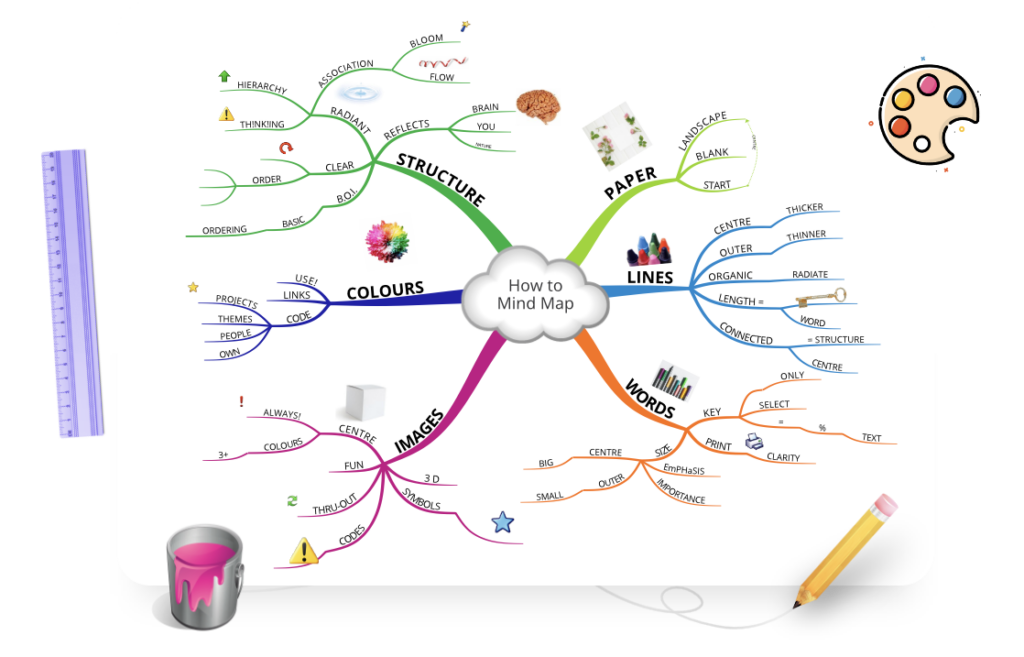
Every mind map begins with a main idea or topic. Use mind mapping software to place this central concept at the core of your map.
3. Add Branches and Subtopics
Expand your mind map by adding branches related to your main idea. Most mind mapping software tools allow easy drag-and-drop functionality to structure information logically.
4. Use Colors and Icons
Enhance your mind map’s visual appeal by incorporating colors, icons, and images. Many mind mapping software tools offer customization features to make your maps more engaging.
5. Collaborate and Share
For team projects, use best mind map software options with real-time collaboration features. This enables seamless teamwork and idea sharing.
Common Mistakes to Avoid When Using Mind Mapping Software
1. Overcomplicating the Mind Map
A cluttered mind map defeats its purpose. Stick to key ideas and avoid unnecessary details.
2. Not Utilizing Collaboration Features
If you’re working in a team, take advantage of mind mapping software that supports real-time collaboration.
3. Ignoring Customization Options
Many mind mapping software tools provide themes, templates, and color options. Use these features to enhance clarity and readability.
Future Trends in Mind Mapping Software
With advancements in technology, mind mapping software continues to evolve. Some upcoming trends include:
1. AI-Powered Mind Maps
Artificial intelligence is being integrated into best mind map software to generate automated suggestions and improve idea structuring.
2. Virtual Reality (VR) and Augmented Reality (AR)
Some mind mapping software tools are exploring VR and AR to create immersive brainstorming experiences.
3. Enhanced Mobile Support
With the rise of remote work, mind mapping software is becoming more mobile-friendly, ensuring accessibility from anywhere.
Conclusion
Whether you’re a student, professional, or entrepreneur, using mind mapping software can enhance productivity, creativity, and collaboration. By selecting the best mind map software for your needs, you can streamline your thought process, organize ideas efficiently, and improve decision-making.
As technology continues to advance, mind mapping software will become even more powerful, offering new features and integrations that will further revolutionize the way we visualize and structure information.