

In the fast-evolving world of textile printing, the DTF printer has emerged as a game-changer for businesses and creative entrepreneurs alike. Unlike traditional printing methods, Direct-to-Film (DTF) technology allows you to transfer intricate and colorful designs onto various fabrics with precision and durability. This innovation has gained massive popularity due to its versatility, affordability, and ability to produce professional-quality results even for small batches.
Whether you’re a startup looking to print custom apparel or an established business exploring efficient methods to meet growing customer demands, understanding the DTF printing process is crucial. Below, we’ll break it down step by step, explaining how it works, the equipment you need, and how to get the best results.
Table of Contents
Step 1: Create Your Digital Design
The first step in the DTF printing process begins with your digital artwork. High-quality designs are key to achieving vibrant and sharp prints. Most DTF printers work seamlessly with software like Adobe Photoshop, Illustrator, or CorelDRAW, allowing you to create or edit designs with ease.
Tips for this stage:
- Always use high-resolution images (at least 300 DPI).
- Save your file in a compatible format, such as PNG with a transparent background.
- Check your color profiles to ensure the colors appear correctly on your final print.
Step 2: Print on PET Film
Once your design is ready, it’s time to print it using a DTF printer on a PET film. Unlike regular paper, PET films are heat-resistant and coated to hold the special DTF inks.
Here’s what happens in this step:
- CMYK Printing: Your design’s colors are printed first, using cyan, magenta, yellow, and black inks.
- White Ink Layer: A white ink layer is then added on top, which ensures the design pops when transferred onto dark or colored fabrics.
Modern DTF printers provide exceptional precision, ensuring that even the smallest details are captured on the film.
Step 3: Apply the Adhesive Powder
Immediately after printing, while the ink is still wet, a hot-melt adhesive powder is applied to the design. This powder acts as the bonding agent between your printed film and the fabric.
Key points to remember:
- Shake off any excess powder to avoid clumping.
- Make sure the adhesive is evenly distributed for a smooth and durable finish.
This step is often done using an automatic shaker, but small businesses or beginners can also perform it manually.
Step 4: Cure the Design
After the adhesive powder is applied, the film goes through a curing process. This typically involves a heat press or curing oven, which melts the adhesive onto the ink.
Pro tip:
- Maintain the correct temperature (usually around 160–170°C) and curing time (2–5 minutes).
- Avoid overheating, as it can affect color vibrancy or adhesive performance.
Once cured, your DTF transfer is ready to be applied to the garment.
Step 5: Heat Press to Transfer the Design
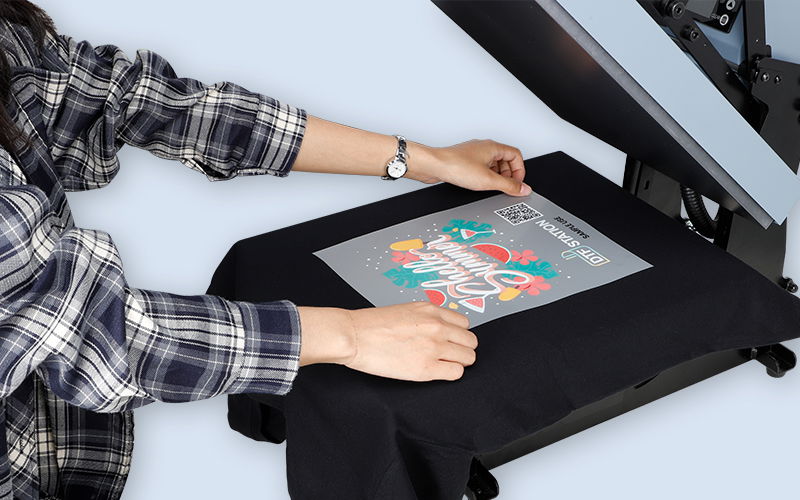
This is the most exciting part of the DTF process — transferring your design onto the fabric. Place your cured PET film on the garment, ensure it’s aligned perfectly, and use a heat press machine to apply heat and pressure.
- Temperature: 160–170°C
- Pressure: Medium to firm
- Time: 15–20 seconds
Once the pressing is complete, let the film cool down slightly before peeling it off. This results in a vibrant, durable design that looks and feels professional.
Step 6: Peel and Finish
When the film has cooled, gently peel it away to reveal the finished design. Most DTF films are “cold peel,” meaning the transfer is safest when fully cooled to avoid lifting any parts of the print.
To enhance durability, perform a final short press (also known as a “post-press”) for 5–10 seconds. This step ensures that the design is fully embedded into the fabric fibers.
Advantages of DTF Printing
DTF printing is not just a step-by-step process — it’s a revolution in fabric decoration. Some of its key advantages include:
- Versatility: Works on cotton, polyester, blends, and even leather.
- Durability: Wash-resistant prints that last for years without fading or cracking.
- Cost-Effective: No need for pretreatment like DTG printing, reducing setup costs.
- High Quality: Produces sharp, vibrant, and photo-quality results.
With brands like DTF LINKO offering cutting-edge machines, businesses can achieve professional-grade results without investing in overly complex equipment.
Tips for Getting the Best Results
To maximize your DTF printing efficiency and quality:
- Keep your printer clean and maintain your print heads.
- Store your PET films and adhesive powders in a dry environment.
- Test print before starting bulk production to ensure colors and alignment are perfect.
- Educate yourself on proper curing and pressing techniques to avoid common errors.
By mastering each step, you can transform plain fabrics into stunning, custom-designed products that capture attention and drive sales.
Final Thoughts:
Understanding the DTF printing process empowers both beginners and seasoned professionals to produce high-quality, long-lasting designs. From preparing your artwork to the final peel, every step contributes to a flawless print. With the right DTF printer, proper technique, and attention to detail, your creative possibilities are virtually limitless.
DTF technology is not just a trend; it’s a reliable, scalable solution for the booming custom apparel industry. By following this step-by-step guide, you’ll be ready to elevate your printing game and deliver products that impress customers and outshine competitors.


