
Generative AI video tools are no longer sitting at the edge of marketing teams as a fun experiment. In 2026, they are starting to solve a plain business problem: companies need more video than their old production process can comfortably make.
A product team needs launch clips. Sales wants short explainers. HR wants onboarding videos. The founder wants social clips. Paid media needs variants. The old answer was to brief a designer, book an editor, wait for a queue, and hope the first version worked. That is still right for some campaigns. It is too slow for the everyday content work that now fills most calendars.
This is why generative AI video tools have moved from “interesting” to “useful.” The promise is not that every company becomes a film studio. The promise is that more teams can get from rough idea to usable draft without waiting days for the first visual version.
Table of Contents
Why the business case is different now
Video has been important for years, but the economics were awkward. Short-form platforms trained audiences to expect motion. Buyers got used to watching product walkthroughs instead of reading long pages. Internal teams began asking for the same format for training, culture, and sales enablement. Demand kept growing, while production capacity stayed limited.
Wyzowl’s 2026 video marketing data reports that 84 percent of consumers want to see more videos from brands, and 89 percent say video quality affects trust. That puts companies in a difficult position. They need to publish more, but low-effort video can damage the brand it is supposed to help.
Generative AI changes the first draft stage. A marketer can test a script as a short visual. A founder can turn a rough idea into a talking-point clip. A product marketer can try several visual directions before asking for a polished campaign asset. The goal is not to skip judgment. The goal is to spend judgment on better options.
That difference matters. Teams do not need a hundred unfinished drafts. They need a faster way to decide which direction deserves human time.
The stack is becoming multimodal
Most companies first met AI through text. They used it for outlines, email drafts, landing page variations, customer support macros, or social captions. Video asks for a wider stack. It needs images, scripts, timing, motion, audio, subtitles, and sometimes style transfer or object editing.
That is why the category is moving away from single-purpose generators. A content team may start with a product image, turn it into a short animation, add captions, clean up an existing clip, generate variations, and resize the output for different channels. A tool that only handles one step can still be useful, but too many single-purpose tools create another problem: files, credits, formats, and approvals scattered everywhere.
Platforms such as iMideo fit the way teams are starting to work because they combine text-to-video, image-to-video, reference-to-video, video-to-video, video effects, image tools, and access to multiple AI models in one workspace. The business value is not only generation. It is reducing the handoff between idea, asset, edit, and output.
For a small business, that can mean a social manager creates draft clips without opening a traditional editor. For a larger team, it can mean creative leads review more options before assigning specialist production time. In both cases, the useful part is the same: AI handles some of the repetitive production burden, while people still decide what should ship.
Where generative AI video tools are actually useful
The strongest generative AI video tools use cases are usually practical rather than flashy. Teams use AI to create draft product teasers, turn still images into motion, test ad concepts, clean up footage, build thumbnails, add subtitles, extend short clips, or adapt existing assets into new formats.
This is different from asking AI to produce a finished brand film from one sentence. That kind of prompt can create something impressive, but it often misses the details that matter in business content. Product positioning, compliance language, customer pain points, and brand tone still need a person who understands the company.
A better workflow starts with a specific job. For example, a software company might have a new feature and a 20-second product recording. The team can generate a short intro, create a vertical version for social, test a few thumbnail styles, and produce a quick explainer for sales. None of those assets needs to be a cinematic masterpiece. They need to be clear, accurate, and fast enough to support the launch.
That is where AI video earns its place. It turns video from an occasional production project into a reusable business process.
The new bottleneck is approval
Once AI makes drafts faster, the slowest step often moves somewhere else. Review takes longer. Legal gets nervous. Brand teams worry about consistency. Managers ask who approved which version. This is normal. Faster production exposes the parts of the workflow that were never designed for volume.
Companies that use AI video well usually build rules early. They decide which assets can be created freely, which require brand review, which need legal approval, and which should never use AI-generated people or synthetic voices. They also create naming conventions, storage rules, and approval records.
That sounds less exciting than a new model demo. It is also what makes the system usable inside a real company.
One practical rule is to separate draft generation from publishing authority. Anyone on the team may be able to create a draft, but only approved people can publish. That keeps experimentation open while protecting the final output.
Visual experimentation is moving earlier
AI video is also changing when visual decisions happen. In a traditional process, teams might choose a concept from a deck, then discover during production that it does not work in motion. With AI tools, they can test the visual idea sooner.
A fashion brand can preview different looks in motion before committing to a shoot. A creator can test a costume idea before renting a studio. A training team can create a rough role-play clip before hiring actors. A product marketer can compare several styles of visual explanation before paying for final animation.
This is where swap-style tools become relevant for legitimate business and creator workflows. For example, this video body swap tool lets a user upload a source video and a reference image, then apply the reference body appearance to the subject frame by frame. The page describes use cases such as costume previews, fashion looks, character content, and commercial production tests, with output options including 360p, 540p, and 720p.
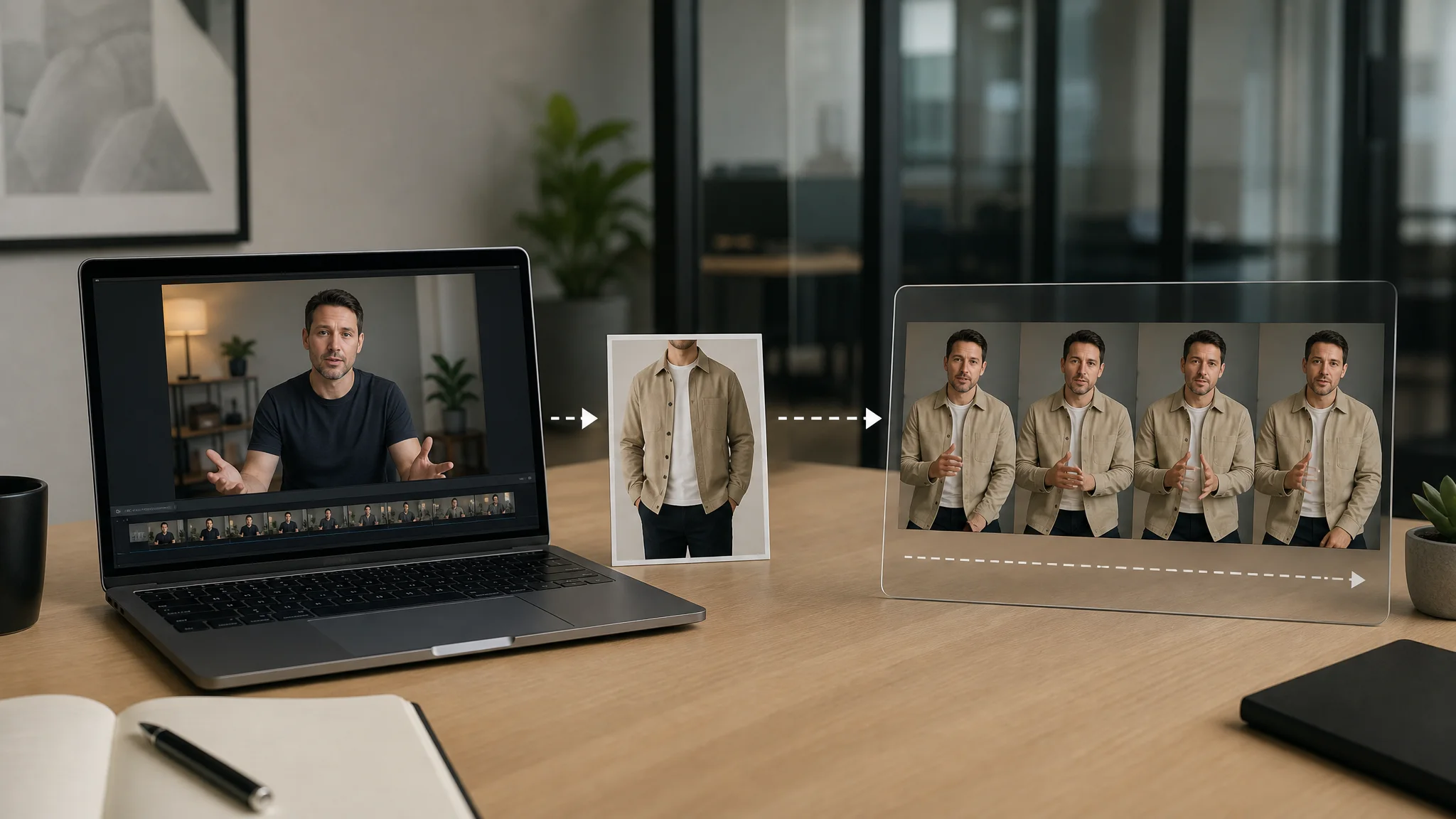
Tools like this need clear boundaries. A business should not use synthetic media to mislead people, impersonate someone, or imply an endorsement that does not exist. Consent and rights matter. So does disclosure when the context requires it. But inside a controlled workflow, visual swaps can help teams test wardrobe, character, and concept directions before spending money on production.
The useful shift is not deception. It is pre-production becoming cheaper and more visual.
Quality still depends on input quality
There is a common disappointment with AI video: a team tries a vague prompt, gets a generic clip, and decides the technology is not ready. Sometimes the tool is the problem. Often the input is.
AI video tools respond better to real constraints. Who is the audience? What is the channel? What is the product? What should the viewer understand after 10 seconds? What should not appear? What brand references matter? Which frame size is needed? The more specific the brief, the less the tool has to guess.
This is familiar to anyone who has worked with a designer or editor. A weak brief creates rework. AI does not remove that problem. It makes the feedback loop faster, which can be useful if the team is paying attention.
The best results usually come from a simple pattern: start with a human brief, use AI to create options, edit the strongest option, then measure how it performs. The AI is part of the production line, not the whole department.
Why small teams benefit first
Large companies have more budget, but small teams often feel the AI video benefit first. A small business may not have a motion designer, video editor, copywriter, and paid media designer on staff. One person may be doing all of that work, usually under a deadline.
For that team, shaving even a few hours from each content cycle matters. Generative AI video tools can turn a rough product animation, a quick explainer, a set of ad variants, or an edited social clip into enough material to keep the calendar moving. The work still needs review, but the team is no longer starting from a blank screen every time.
There is also a testing advantage. Small companies often cannot afford to make one expensive asset and wait weeks to learn whether it works. AI-assisted production lets them test more modest creative ideas and learn faster.
That does not mean every output should be published. It means more ideas can be evaluated before the team spends serious money.
The risk is sameness
The obvious risk with AI content is factual error. The quieter risk is that everything starts to look and sound alike. Smooth lighting. Generic offices. Empty motivational language. Stock-like people. The more teams use similar prompts, the more this happens.
A company does not get a content advantage by using the same tool in the same way as everyone else. The advantage comes from better inputs: customer calls, founder opinions, product details, sales objections, market context, and a clear sense of what the brand would never say.
The same applies to video. A prompt that says “make a professional business video” will probably create something forgettable. A prompt based on a real product use case, a specific buyer, and a clear message has a better chance of producing an asset worth editing.
AI lowers the cost of average content. That makes original thinking more valuable, not less.
What businesses should build next
The smartest next step is not buying every AI video tool. It is mapping the content workflow. Where does the team slow down? Ideation, scripting, visual production, editing, approvals, formatting, or distribution? Different bottlenecks need different tools.
After that, companies should create repeatable workflows. A product-launch workflow. A webinar-to-clips workflow. A founder-post workflow. A paid-ad-variant workflow. A training-video workflow. Once the process is repeatable, AI can reduce the manual work around it.
Teams should also measure something better than output volume. More videos do not matter if they do not help sales, retention, hiring, education, or customer trust. The better question is: what did the team learn faster because production was easier?
Generative AI video tools will keep improving, but the companies that benefit will not be the ones that publish the most synthetic content. They will be the ones that use AI to shorten the distance between a useful idea and a clear, approved asset.
That is the real business shift. Video production is becoming less like a rare project and more like an everyday operating habit.